Showing posts with label Colfax. Show all posts

September 26, 2014

Palouse Abandoned House Photography Tour

Palouse Photography Tours with Teri Lou
It was a busy summer and therefore my blogging came to a stand still. My goal for next month is to get back to it! As most of you know who follow my Facebook posts I became a grandma to Brayson John and my youngest daughter was a bride just last week. I also was thrilled to visit the Palouse several times as a tour leader.

Speaking of touring the Palouse... I recently launched a new website that I hope you all choose to follow. I also have a Palouse Meetup group anyone can join and of course a Palouse Facebook page that many of you 'liked' already - thanks much. In other words I am loving everything Palouse! and I get to visit next month since I am leading a private tour - lucky me!

Since I love the Palouse and leading tours I have recently announced 5, yes 5, Palouse tours for 2015. (and as always I am available for private tours all year long). The Shades of Green tour is being offered 3 times since May and June is such a popular time. Then in August I am offering the Abandoned House Tour and the Harvest and Family Farm Tour. Please check them all out since they each have unique opportunities.

Today I am highlighting the Abandoned House Tour since it was just announced and is available to only 4 participants. So I wanted you loyal blog followers to get the first opportunity to sign up. Please contact me if you have any questions.

I call this one Edith's Chair - Palouse Abandoned House

I have captured this chair in many different ways over the last 5 years. Palouse

Treasure in Palouse Abandoned Houses - come tour with me in August.

Teri Lou loves the Palouse - can't wait to visit again!

June 22, 2014

Magic Moments - iPhone Photography


I had dinner with my good friend Rod the last evening I last visited the Palouse. We talk about how much I valued the time he took me to the Garfield Cemetery and told stories about friends and family that were buried there. It was during those moments that I realize just how special it is to live in a place where your roots run deep. Why your word matters and why honoring a handshake deal is so important. 


After dinner the clouds were forming at the horizon in a way that made me believe the sunset would be fabulous. 

Since I was close to Colfax I decided to remember this evening by capturing the sunset in the Colfax Cemetery. 


As I walked around I discovered a statue of a little boy who died at the age of 7. I decided my image would honor the memory of this child.  So I composed the shot, tapped the button in ProHDR and spent the next few seconds admiring the golden rays. After ProHDR did its magic of combining the two image, I tapped the save button and finally saw the image. A silhouette of a bird was perfectly places above the little boy's head. I then looked at the statue with no bird in sight and then back at the captured image. 


The moment warmed my heart and I felted blessed to truly be in the right place at the right time.  


Rod called me just a minute ago. He asked how I enjoyed the sunset. I told him my story and he thought it would be wonderful if I printed this image for the boy's parents. I told him I would.  I am delivering the framed print this weekend. 

Such a wonderful day it was!

July 19, 2011

Photo Contest - Winner receives free iPhoneography 101 Course


written by fxPhotoStudio

Creative challenge: win free iPhoneography course

Either you consider yourself a pro iPhoneographer or still a beginner, it is always good to get some additional practice and learning. Here is an awesome creative challenge for you with a chance to get FX Photo Studio PRO for Mac and - attention here - FREE iPhoneography 101course from a great photographer Teri Lou Dantzler.
—
Rules are as simple as ABC. Here are pictures, taken by Teri Lou (check more on our Facebook page). Pick any of these images and see what you can turn them into with the new FX Photo Studio 4.0. Apply masking, mix 194 effects and inspire the artist within. Challenge ends on August 2nd and starts from the second you read this post.
—-
When you are done with images, upload them on Facebook or submit via email(atsepko(at)macphun.com) with a subject “creative challenge”. Good news: you can use other photo apps as long as you use FX Photo Studio.


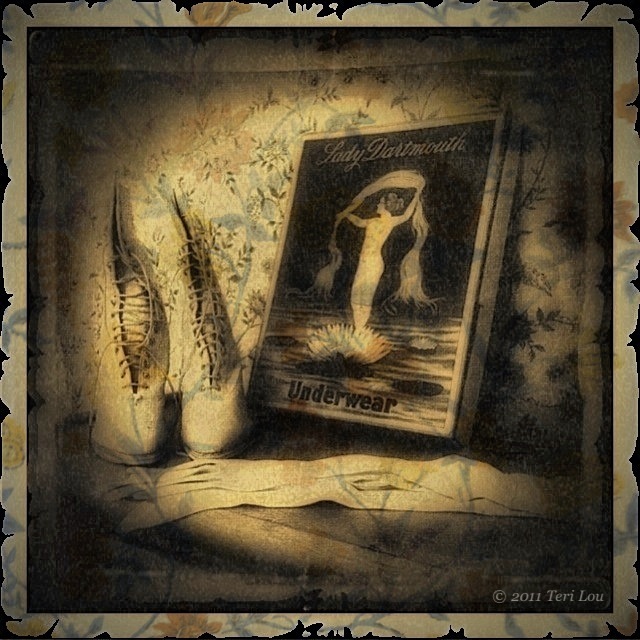
Today's blog image was captured in the Perkins House in Colfax, WA. I captured it with the HIpstamatic camera, however TimelessPhoto changed the square image into a rectangle.

Hipstamatic
PerfectPhoto
fxPhotoStudio
TimelessPhoto
Blender
Filterstorm
Grungetastic
DynamicLight

When processing this image I just couldn't stop. I loved the original image straight out of Hipsta and then I loved the effect with just fxPhotoStudio and TimelessPhoto. But then I wanted to use PencilPaint and AncientCanvas filters to give more color and dimension to the image. Next I had to use Filterstorm to dodge and burn in places. Then I wanted to add more to the rather large white frame,  so that is why I used Grungetastic. At this point I thought it looked terrific until I remembered DynamicLight, so I decided to add a little bit of it too. The art of processing is addicting to me. At times I am like the energizer bunny, I just keep going and going and going....lol!


iPhoneography Classes Available Now! - next class starts August 1st - limit 6 student per course. If you would like to learn how to capture and process iPhone images beyond a basic snapshot take an Online iPhoneography Course with Teri Lou. Two courses are available iPhoneography 101 and iCreativity. Click on the direct links in the upper left hand column of this blog for information, pricing and schedule.

June 26, 2011

Perkins House Ice Cream Social 2011

All dressed up and still being teenagers
I had a special treat for the Palouse photo tour ladies this weekend, Today was the Perkins House Annual Ice Cream Social. Yes the ice cream was delicious and so was the homemade pies.

During this event the young ladies of the area wear period dresses and model them in front the the crowd. These two girls had finished their modeling duties and posed as 'Lady Teenagers' for me.

It was wonderful to be able to sit in the shade and process this image so I could email it to them before I left. One of the many reasons I love the iPhone.

Hipsta
PicGrunger
Vignettr
Filterstorm
Impression

iPhoneography Classes Available Now! - next class starts July 11th - limit 6 student per course. If you would like to learn how to capture and process iPhone images beyond a basic snapshot take an Online iPhoneography Course with Teri Lou. Two courses are available iPhoneography 101 and iCreativity. Click on the direct links in the upper left hand column of this blog for information, pricing and schedule.

May 26, 2011

Step by Step iPhone App Processing

Another image from the Perkin House, Colfax, WA

Today's image was a surprise to me. From the beginning of the processing procedure, I decided I wanted to create an old photo feel, so instantly the app OldPhotoPro came to mind. (As always I sharpened the image first before applying any additional filters.) While finding that app I came across the app PhotoTreats and decided to remind myself to what was available there. I found a filter that super saturated the image and decided to apply it before bringing it into OldPhotoPro.
In OldPhotoPro I tried some various combination and instantly feel in love with the ragged frame. Even though the frame did add the appeal I was looking for I also wanted to continue playing with the possibilities of different framing options so I opened the image in fxPhotoStudio and added a thin black frame. I brought the image into OldPhotoPro again to add the ragged frame to the black portion.
Now with the thought of wanting to paint in the wall paper textureas part of the frame, I also captured that day, I once again added a frame in fxPhotoStudio but this time in white and wider so it would show through when blended in the app Blender.
Each time I processed the image in OldPhotoPro it became more aged and darker. I definitely liked the aged look but thought it was too dark so I used the app DynamicLight to brighten it a bit. Next I sharpened the image again using Perfect Photo. Then I was ready to blend. Using the simplest blending mode app, Blender, I opened the most current version and the wallpaper texture. My plan, as I stated earlier, was to paint the wallpaper just into the frame, however when I chose the multiply option I just loved how the wallpaper blended so well into the whole image - Surprise!
Even though I loved the look on the wallpaper on the image, I didn't want it to be as strong as the portion on the frame so next I opened the image with the blended wallpaper and the one just prior to that in Filterstorm and with a very low opacity brush lightened the inside of the image.
As always I added my copyright watermark with Impression.

This is just a concept that I wanted to share with all of you. It can be used in several ways. I hope this demonstration and explanation motivates and inspires you to see what is possible. I have many more lessons like this in my iCreativity course that is starting Tuesday May 31st.

For the step by step images I used the app Diptic.

original Hipsta Dream Canvas,  OldPhotoPro, fxPhotoStudio, OldPhotoPro

FxPhotoStudio, OldPhotoPro, DynamicLight, Filterstorm


iPhoneography Classes Available Now! - next class starts May 31st. If you would like to learn how to capture and process iPhone images beyond a basic snapshot take an Online iPhoneography Course with Teri Lou. Two courses are available iPhoneography 101 and iCreativity. Click on the direct links in the upper left hand column of this blog for information, pricing and schedule.

May 21, 2011

Framing the Parlor

Another gorgeous room in the Perkins House

ProHDR
AutoStitch

Frame was created using:
PhotoStudio
AutoPainter HD
Artista Haiku
Blender
FIlterstorm

Just playing around today, to see what is possible!
iPhoneography Classes Available Now! - next class starts Monday,May 23rd. If you would like to learn how to capture and process iPhone images beyond a basic snapshot take an Online iPhoneography Course with Teri Lou. Two courses are available iPhoneography 101 and iCreativity. Click on the direct links in the upper left hand column of this blog for information, pricing and schedule.

May 20, 2011

Purse on Loan - Perkins House


Another great image created in the Perkins House, Colfax, WA.

Hipsta
PerfectPhoto
PhotoStudio
Blender
Filterstorm


iPhoneography Classes Available Now! - next class starts Monday, May 23rd. If you would like to learn how to capture and process iPhone images beyond a basic snapshot take an Online iPhoneography Course with Teri Lou. Two courses are available iPhoneography 101 and iCreativity. Click on the direct links in the upper left hand column of this blog for information, pricing and schedule.

May 18, 2011

Perkins House - Colfax, WA

The Parlor
The Perkins House is an amazing place in Colfax, WA. My iPhoneographer friend, Dick, and I were treated to a special time there today. Thanks Steve! I captured so many images that my head is spinning today. Here is a very unique version of an image that I saw years ago and couldn't wait to capture myself. It isn't my normal work the high contrast image but it works for me.
I combined two Hipsta images in Blender and finished my work flow in Filterstorm.

I am sure I will be posting other images from not only the Perkins House but also the Palouse for days!


Sign up Now!!!
iPhoneography Classes Available Now! - next class starts May 23rd.

If you would like to learn how to capture and process iPhone images beyond a basic snapshot take an Online iPhoneography Course with Teri Lou. Two courses are available iPhoneography 101 and iCreativity. Click on the direct links in the upper left hand column of this blog for information, pricing and schedule.