Showing posts with label fxPhotoStudio. Show all posts

April 21, 2013

An iPhoneographer at Play - Self Portrait

Times in my own world with my camera and creativity are full of playful moments. I am known for my self portraits of "my backside" and regularly search for a creative playful way to capture them.
While on the swinging suspension bridge at 5280' on top of Grandfather Mountain I took advantage of the foggy weather to capture this image.

ProHDR
Snapseed
FX Photo Studio
Filterstorm
Grungetastic


November 24, 2012

OMSI Abstract

An Abstract from an image I captured at the OMSI

I went to the OSMI in Portland yesterday and watched the latest Batman movie. Before it started I entertained myself with the colors of light beaming across the screen. This evening I created my masterpiece abstract.
Stay tuned for a video tutorial of the process!

The original image at OMSI

November 6, 2012

Palouse Workshops - June and August - Sign up NOW!

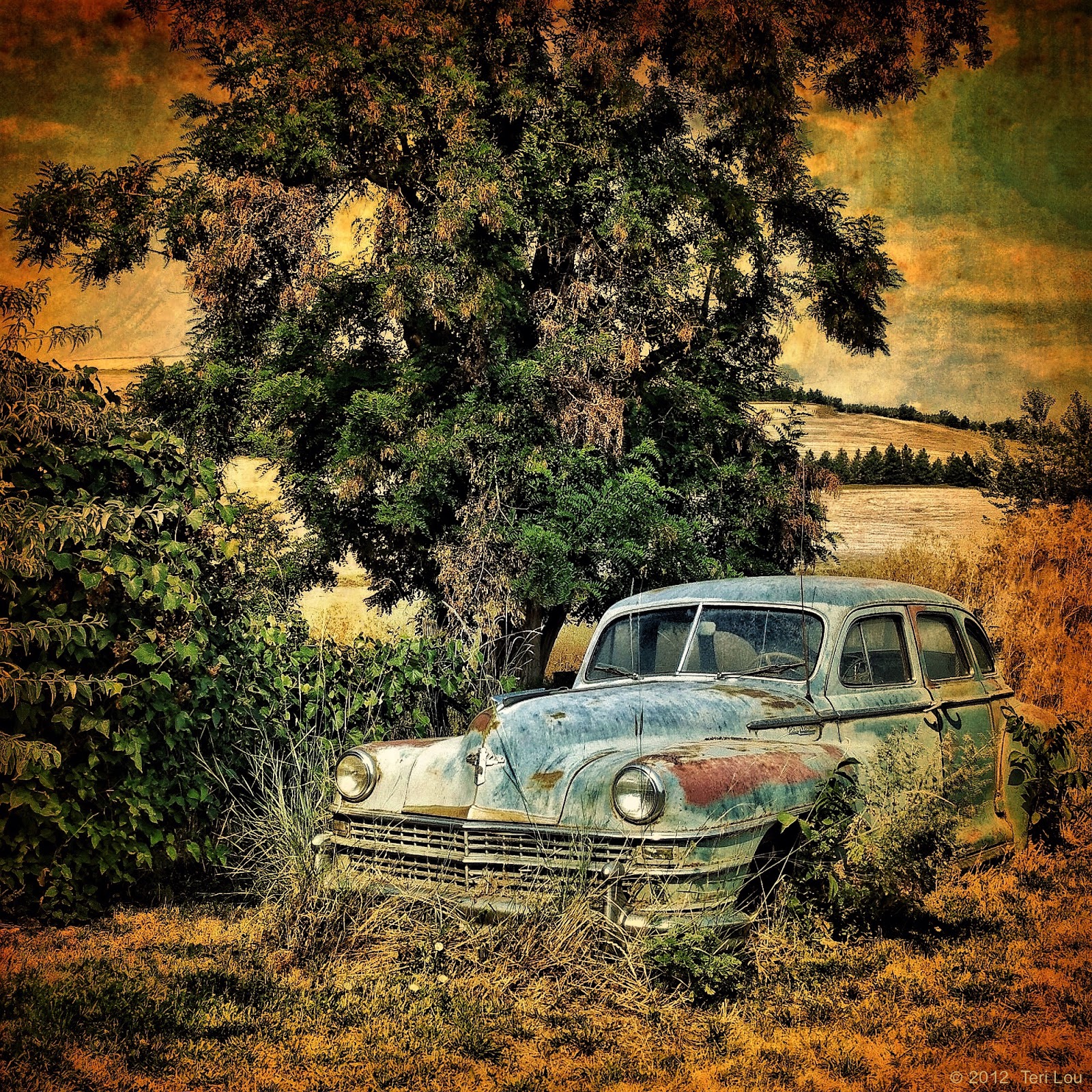
Processed Image of a car just outside of the Palouse
The original image - flat and uninteresting
Had fun with this one today! I used Snapseed, TouchRetouch, fxPhotoStudio and Filterstorm to create this dramatically improved image!

This weekend I put together the itinerary for the Palouse workshops in June and August. I will be starting the Workshop with a two day Beginner iPhoneography Class, then have a three day Palouse Photo Tour, followed by a two day Advanced iPad Creativity class.
So it will be a week full of fun and possibilities. Send me an email at teri@terilou.com to reserve your spot with a $100 deposit NOW!

Come join me on Google+ Hangouts. Circle me and I will invite you to join in the fun.

October 19, 2012

Before and After - Creating Mood Part II

Happy Pre Halloweeen
Many photographers discuss the concept of pre visualization. Personally I think the concept is great and the execution is difficult.
Ok, you are out in a field and see two dead trees on a sunny hot August day, do you say to yourself, "These trees would be perfect to process for an October Halloween scene!" Most likely not. However today when I am going through my catalog of images I liked and haven't processed yet, I did think just that. Not pre visualization in the field but perhaps pre visualization prior to processing.
Now to execute the idea. What mood does Halloween represent to me? Orange and black came to mind, and so did spooky - the trees were dead. So, as I often do, I opened the image in Snapseed and started to apply my magic. With Snapseed I was able to capture the golden orange and black look. Next I wanted the Old Photo Pro frame. Then I re opened it in Snapseed to saturate the orange once again. However the trees now needed some more definition so I used FX PhotoStudio to help achieve it and then using Image Blender I added a small amount of the effect.
In conclusion, as the image presented itself, I moved onto the next app that I knew would give me the look I wanted to accomplish. I believe that you can have a wonderful visual in your head, but if you don't know what is possible and you don't know what tools you have to make it possible, you will never achieve your goal. So practice, play, discover and explore.

Before


Learn how to create artistic iPhone Photography images with easy to follow online courses. Next course starts October 29th. Please see side bar for more information. Come join me on Google+ Hangouts. Circle me and I will invite you to join in the fun.

October 13, 2012

Mobilgas - Celebrating the Past

Mobilegas in Ellenburg, WA
I so appreciate the nostalgia of this location in Ellensburg. It has great hamburger and shakes too. Be sure to stop by if you are in the area!

Filterstorm
Snapseed
Image Blender
Moku Hanga HD
Dynamic Light
FX Photo Studio

Learn how to create artistic iPhone Photography images with easy to follow online courses. Next course starts October 29th. Please see side bar for more information. Come join me on Google+ Hangouts. Circle me and I will invite you to join in the fun.

August 31, 2012

iPhoneography 101 - Online Course - starts Monday

The Burnside Bridge Portland

I have been spending time in the Portland area lately. It is so much fun to learn about the different neighbors here. A friend is opening up an Urgent Care Express in the Hollywood neighborhood soon. It is his 4th clinic in the area. I am enjoying helping him with all the details - website design, interior floor plan layout, slogan, colors, signs, colors... the list is never ending. It has been a longtime since I have been involved in a building project like this. It feels great, comfortable and familiar, like an old friend has returned.

I created this image many months ago. I know I used Filterstorm, PhotoForge and fxPhotoStudio. Not sure if there were others.

Sign up NOW!
Learn how to create artistic iPhone Photography images with easy to follow online courses. Next course starts September 3rd. Please see side bar for more information. Come join me on Google+ Hangouts. Circle me and I will invite you to join in the fun.

August 30, 2012

Creating Custom Textures with fxPhotoStudio

As I have been preparing for a tutorial today, I needed to use a texture blend. However the texture I wanted was a frame in fxPhotoStudio so it needed to be created.
One the the textures I already had in my iPhone Texture Album was a blank white canvas, so I imported it into fxPhotoStudio and started to apply different filters to it. Below are a few choices that I really liked and now have saved for future use.

Imported blank canvas photo into fxPhotoStudio 


Old Sketch Texture

Crumpled Paper Texture

Nior Blue Texture or Border

Burnt Paper Texture or Border

This time I added Dirty Picture 2 after applying the Burnt Paper

Then I decided to create a texture with Burnt Paper, then Rusted Metal 2 and finally Dirty Picture 2.
The possibilities are endless. I will use a few of these in a future blog.


Only 2 spots left in iPhoneography 101. Sign up NOW! 
Learn how to create artistic iPhone Photography images with easy to follow online courses. Next course starts September 3rd. Please see side bar for more information. Come join me on Google+ Hangouts. Circle me and I will invite you to join in the fun.

August 27, 2012

Wheat Texture Blending into Bald Blue Sky - iPad Processing Tutorial

Abandoned Combine of Yesteryear
The Palouse is known for its incredible puffy blue skies, however the week of the workshop they were often bald blue.

In this particular multi-stitch image I wanted to find a creative texture for the sky. I tried some app textures but they didn't quite create the look I hoped. So I looked through the many images I captured that week and was inspired by the simple concept of the wheat field.

Bald Blue Sky before adding wheat texture

Wheat Image used for Blending
Using Image Blender, I first imported the Combine photo into the left (dominate) corner. Then I imported the wheat image into the right corner. For this blend I chose Overlay at about 25%.
Filterstorm was used for the next step. First I imported the Blended image. Next in the Filters tab, click on Add Exposure and import the original bald blue image. After tapping on 'Fit to Image' you can then paint away the texture from everywhere except the sky. When applying this method I prefer to have a large soft brush with a low opacity. It is suggested that you zoom into the image for final touch up.
I continued the processing of the final image with fxPhotoStudio, Vintage HD, blending in ImageBlender, TouchRetouch and final touches in Filterstorm. The step by step process will be taught in my iCreativity course soon, as I am totally rewriting the online course materials.

On a final note: Even after all the processing was complete, this image can easily be printed 11x27 inches in size and is 12 megapixels.


Learn how to create artistic iPhone Photography images with easy to follow online courses. Both iPhoneography 101 and iCreativity starts September 3rd. Please see side bar for more information. Come join me on Google+ Hangouts. Circle me and I will invite you to join in the fun.

July 15, 2012

iPhone Photography and The Golden Hour

Alice Lake
There are many ways to be creative with the iPhone and iPad. It still amazes me that I can see an image that I admire that was captured and processed big girl style and figure out how to duplicate it iOS style.
This is an example of how you can create a rich golden image from a colorful one.

I made several variations of this image until I finally decided on this one.

Snapseed, fxPhotoStudio, Noir, TouchRetouch, Blender, Filterstorm, PhotoForge

Original


iPhone Photography courses start TOMORROW July 16th. SIGN UP NOW!

Please see side bar for more information. Come join me on Google+ Hangouts. Circle me and I will invite you to join in the fun.

June 10, 2012

First Public Hangout

Today I had my first public Hangout on Google+. Even though there were a few glitches it was inforamtive and successful. Go to MyiPadLive for the YouTube links.

Here are the images I promised to post after today's Hangout.

The original Hipstamatic Image

fxPhotoStudio layer with Yellow Glow

3rd layer after combining the original and fxPS layers in Image Blender

Final image after using Filterstorm to paint in the yellow into the flower in just all the right places.


Be sure to see the YouTube video links for much more detailed information.

Still a few more spots left in the online courses starting tomorrow. I look forward to sharing a few hangouts with a wonderful group of student this month. Sign up and find more information on the left side bar link.

Online iPad lessons are now up: go to http://www.myipadlive.com for more information.

April 25, 2012

Roslyn Cafe - Meetup May 19th

The Roslyn Cafe was made famous by Northern Exposure in the early 1990's. It is still an icon in this historic mining town. I will be doing a Photowalk on May 19th - Come Join me.

On another note:
Seems to be a lot of talk lately on what to call this 'new' art form: iPhoneography was catchy but not so much anymore, some say. Mobile Photography seems to be a newer version so it can include all 'mobile' devices. Many people believe that no matter the how the image was captured it is all photography. Still others insist on the label so they can have contests, gallery showings or websites full of images in a particular category.

My take is that I am a Photographer. I happen to prefer to use my iPhone to capture my images and my iPad to process them, at this time in my life anyway. I choose to label my blog as iPhoneography because that is what I do and teach. I choose that option so I can show what is possible on them, I choose to specialize in them.

Just like all the other cameras, mine has its pros and cons. I am familiar with the limitations and the strengths of my devices. I am passionate about the ability to capture and process with these portable devices that can be connected to the world wirelessly. I love to have the option to be artistic at anytime since my iPhone is with me practically 24/7 and my iPad is nearby almost as often.

The bottom line is that I will keep the name iPhoneography as long as it makes sense to be able to find me and my specialty so I can continue to share the possibilities. I do believe that more and more photographers are choosing to process images from all types of cameras on their iPads, however, I don't plan on becoming an iPadprocessor, but if that is what people label me so I can help them better process their images on that device so be it.

Please check out the latest version of Crop'n'Frame. Some time ago I requested the option to have presets and they are now available. 


Snapseed
fxPhotoStudio
Crop'n'Frame


Peter Valley Workshop still has space available. Click on the link on the left column for more information. 

Online courses start again on May 14th. Sign up soon.

Coming Soon!!! MyiPadLive - online Tutoring and Lessons.

March 22, 2012

Nepalese Girls at Work

Hard working Nepalese girls heading home after a long day!

While trekking in the lowlands of Nepal, I would see many people hard at work. However I was most impressed with these girl's loads. As they approached I set up my tripod and captured a few images.  They never stopped but their smiles and looks of curiosity will stick with me forever.


The Last Pixel Show is heading to Napa Valley - space is still available.

March 21, 2012

iPhone Battery Issue - Shutting Down at 25%

Self Portrait, Volunteer Park, Water Tower, Seattle
I was having issues with the battery on the iPhone 4s I got just a few weeks ago to replace my other 4s. It was totally shutting down when the battery had 25%. I was having the issue before and after the update from 5.0 to 5.1. To try to resolve the issue I went to the Apple Store yesterday after I backed up the phone through iTunes.

Some diagnostics were run on the phone and because there were issues with some standard iPhone installed items I was told they would once again give me a new phone. Yeah, I thought! However, when it was recommended that I don't restore the new phone from an iTunes back up of my old phone I was totally bummed. I knew that this news would require me to re-create all my folders again and when you have 403 apps it is a long boring task.

Since the photos would not be transfered to the new phone because I wasn't restoring, I wanted to make double sure all the images I had on the phone were backed up on my computer. An employee recommended that I use iPhoto so I started asking some questions about the process of backing up this way and discovered that iPhotos file structure wasn't easily read as folders on the computer outside of iPhoto. I also discovered Photo Capture and that it 'dumps' all the images you have on the phone into one folder.

Being most familiar with Lightroom, I chose to use it to back up all my photos for two reasons:  I could understand the folder structure and I could make an additional backup on an external device at the same time.

I had about 6000 images on my phone so I chose to back it up last night and returned to Apple today to get my newest iPhone 4s. Now I will have to make sure all my camera and processing apps are set up again to the highest resolution preferences. I will also need to restore my Hipstamatic purchases, reset my wallpaper images, enter all my wireless passwords...actually it is amazing how many presets you set up on your devices.

I am heading to Denver to see family tomorrow. I will be sitting in seat 30A moving apps into folders for 3 hours or so. At least I can copy the same folder structure I created on my iPad on Sunday. Who says technology saves us time?

The Last Pixel Show will be in Napa Valley, April 5-9 2012. Sign up now! We arrive in the Palouse this August. Please click the images on the sidebar links for more information. 

March 2, 2012

Demo of Photoshop Touch

EMP - Seattle
Today I watch both Photoshop Touch demos with Julianne Kost by Adobe. I must say the app is impressively complex and can create amazing compositions. I am very motivated to get started and plan on attempting a composite image for tomorrow's blog.
Since I have not used Photoshop in a very long time, (I have been a pure app girl for 1.5 years now.) I believe Touch will take me awhile to learn, how to use and navigate.  However, I will be very glad I put the forth the effort.

Today's image is from last Sunday's shoot in color. I processed it using some filters in fx PhotoStudio and with Snapseed.

Online courses start again on March 5th. Sign up soon.

The Last Pixel Show is pleased to announce two destination iPhone Photography Workshops. The first is in Napa Valley this April and the second is in Palouse this August. Please click the images on the sidebar links for more information. You can also go directly to the website at http://thelastpixelshow.org.


February 21, 2012

Passenger View - Tuk Tuk - Cambodia

Tuk Tuk Ride in Siem Reap heading to Angkor Wat temples


The best way to travel as a tourist in Cambodia is by renting a tuk tuk and driver for the day. Both in Siem Reap and Phnom Phen the rate was $25 per day. You would get picked up at your hotel, driven to the locations of your choice during the day, and end the day back again to your hotel; it could be up to a 14 hour day. All day long the driver would just wait for you while you went to the various temples, restaurants, museums, roadside attraction, any where.

The day I arrived in Phnom Phen by bus the number of eager tuk tuk drivers was typically large. In January they outnumber the tourist by a large number since it was slow season. You can haggle a bit but they all seem to have a set price to take you from the bus station to your hotel. Once at the hotel they ask many questions about your stay and where you want to visit trying to get you to commit to them for your entire stay.

The drivers usually don't speak much English but they know enough to understand where you want to go. Only once were we taken to the wrong place. If I had to do it over again I would  rent a bike to travel around Angkor Wat. It would have taken a bit longer to get to the destinations but I would have enjoyed being able to stop at all the photographic locations of my choice.

ProCamera
fxPhotoStudio
Filterstorm

The Last Pixel Show is pleased to announce two destination iPhone Photography Workshops. The first is in Napa Valley this April and the second is in Palouse this August. Please click the images on the sidebar links for more information. You can also go directly to the website at http://thelastpixelshow.org. 


 Online courses start again on March 5th. Sign up soon.

February 15, 2012

Lowland Trekking in Nepal

Tried to figure out what to use as a reference point to straighten this image but everything is crooked.
 So I just left it as it is.


There are many different treks to choose from in Nepal. Most climb into the high alpine region where trails pass villages that dot the countryside and end high on a mountain peak. However in January, the coldest month, the treks are more limited. So after the first 10 day LangTang trek, where I was freezing most of the time, we asked Walker's Expeditions if it was possible to trek at a lower elevation for a few days.  Mr. Karki, the owner, was most helpful and recommended many choices.
So after enjoying Latte Mochas for a few days at Himalayan Java in Kathmandu we headed on another trek. This time the trails were closer to the bigger villages, where at times, we could hear the familiar horn of the city bus signaling that is was about to drive around a blind corner. The trail also had us walking through backyards and along dirt roads. I missed being in the solitude of the high alpine, but not the cold nights and freezing mornings.
Today's image was captured on this lowland trek. The houses in this region were made with stucco or brick. Much different than the stone houses we saw along the other trail.

ProCamera
fxPhotoStudio
Image Blender
Snapseed
Filterstorm


The Last Pixel Show is pleased to announce two destination iPhone Photography Workshops. The first is in Napa Valley this April and the second is in Palouse this August. Please click the images on the sidebar links for more information. You can also go directly to the website at http://thelastpixelshow.org


Online courses start again on March 5th. Sign up soon.

January 13, 2012

Cooking in the Himalayan Mountains

I am sitting on a bench in the sun at 12,500 ft in the foothills of Langtang Mountain Range (Himalayan Mountains) all wrapped up in two coats, long johns and a thick blanket because it is freezing. I am looking at the outside walls of the building closest to me that is spattered in yak dung. The dung is put there to dry. Then it will be pried off and used in the oven to cook and heat with.

This morning I sat in the family kitchen on a plastic stool next to the stove with mom, dad, two kids, the guide and the porter. The stove was homemade of mud and concrete and heated with wood and yak dung. There were two 4 inch in diameter holes on top of it, one was covered by a large steel teapot and the other with a pan of milk and rice for rice pudding. The kitchen was well stocked with large pots, frying pans and all the necessary table wear. I also saw dozens of fresh eggs and potatoes.

My typical meal has been:
Breakfast: ginger lemon tea always with sugar, milk coffee with sugar, scrambled egg with yak cheese, vegetables (cabbage and kale).
Lunch: ginger tea, pasta noodles , eggs, with extra vegetables and yak cheese, French fries, ketchup
Dinner: ginger tea with mashed potatoes and yak cheese, noodles with vegetables
In other words the same things all day long disguised in a variety of ways :-)

After I ate my breakfast I observed the father making Tibetan Bread, a buckwheat round flatbread that they eat with everything. First the dough is fried on both sides in a frying pan on top of the stove. Then it is browned directly on the yak dung coals turning it often with their bare hands. They were also throwing boiled bite size potatoes with or with out the skin on the coals to warm and eat directly from the fire.
It was a cozy morning, one that I felt honored to be apart of.

December 31, 2011


Welcoming in a New Year! 

I had a terrific 2011 full of amazing experiences. All I have to do is look back on my blog posts to see how terrific it was. I have new friends from around the world that I communicate with on a regular basis. The communication may be through wonderful social media options, email, or chat - it doesn't seem to matter how we communicate just as long as we do.

I have traveled far and away this year. Visiting many new places, sleeping in my car, staying in hotels and sleeping in friend's spare rooms. My daughter has brought me to and picked me up from the airport more times then she can count. Thanks Suzanne!

This will be the first time I celebrate the New Year away from home. Hard to image that I will be in Kathmandu, Nepal. I wonder what I did to celebrate? (I am post dating this blog so I don't know what the future brings.) I am sure it was terrific.

I will not be posting much in the next 5 weeks as I will be traveling through different parts of Asia. This is my first trip to this continent. I am excited!!! I packed light so I can move around easily. I am in good hands as my traveling companion, Mark, has traveled to many of the places we will go and is a doctor. Always good to have one nearby.

Hope to see many of you in 2012. You just never know where I will pop up next. Cheers!


This blog post was created by starting with a Hipsta capture using the Dream Canvas film of a white piece of paper. I then used Filterstorm to add the colors in the different tonalities. Next I used WordFoto. I finalized it with a simple frame in fxPhotoStudio.


The Last Pixel Show is now putting together their 2012 iPhone Photography workshop list and calendar.

The next iPhoneography Classes Available February 13th 2012! I will be out of the country and unavailable for most of January 2012. upon my return I will have fascinating images from many Asian countries.

December 24, 2011

Panel of Trees

Add caption
A simple image made complicated. I reworked this image three times before I was happy with the concept.

Merry Christmas Eve to all! Celebrate, be safe and jolly!

ProHDR
PhotoWizard
Filterstorm
fxPhotoStudio
Blender

December 16, 2011

Hipstamatic Retro Pak One and Retro Pak Two

Retro Pak Two $3.99
Retro Pak One $1.99


Ever since I had to restore my old iP4 I have not had the Dream Canvas Film and Salvador lens. So when I heard they were being offered today I bought them again. BTW they are being offered only until Sunday Dec 18th so if you want to purchase either Retro Pak do so NOW!

It is rare that it is ever necessary to buy anything twice through iTunes. My problem was I originally bought Hipstamatic with an old iTunes account and the in app purchases were on a new one.

Also on Sale for a limited time:


A special Christams discount is being offered on fxPhotoStudio for the iPhone. It is currently available for only $.99. The special Christmas price will last for a limited period during holidays.

The newest application version (FX Photo Studio 4.5) includes new text labels, iPhone 4S high resolution support and an option to submit photos to monthly contests in order to gain different prizes.

Other exciting news: FX Photo Studio for iPhone is the official application of the International Photo Show is  in New York on the December 16th - December 22nd. More than 7000 submissions were sent from all parts of the world and 150 winners are selected.  I am proud to be among the finalists; along with Harry Sandler and many past students - congrats to EVERYONE! 

Everyone is welcome to come and visit Soho Gallery in NY to enjoy best works and to choose winners of the show. Also you can visit the official site of the show to follow updates.  iPhoneography Show link.