Showing posts with label classes. Show all posts

June 30, 2011

Little Jewels of the Palouse

iPhoneography Classes Available Now! - next class starts July 11th - limit 6 student per course.

Another wonderful scene from the Palouse
Prepared several blogs posts all at the same time to get ready for a week long camping trip, so I didn't keep track of the processing apps I used as much as I usually do. I know I used filters from fxPhotoStudio, Blender and Filterstorm. This combination allows for limitless possibilities.

Enjoy your week.


If you would like to learn how to capture and process iPhone images beyond a basic snapshot take an Online iPhoneography Course with Teri Lou. Two courses are available iPhoneography 101 and iCreativity. Click on the direct links in the upper left hand column of this blog for information, pricing and schedule.

May 29, 2011

Farmer's Tools

It was my experience that most farmer's are not this organized

I went to visit my friend Rod, a 3rd generation wheat farmer in the Palouse, a couple weeks ago. I captured a small section of his workshop tools. He is incredibly organized. Most farmers are very skilled at many things. Rod can repair and replace all parts on a his farm truck, lawn mower, tractor, combine and other various attachments. He is also a skilled welder and horseman. However when it came to putting a barbecue together last year he was very grateful for my help because I actually read the directions.
iPhoneography Classes Available Now! - next class starts May 31st.

If you would like to learn how to capture and process iPhone images beyond a basic snapshot take an Online iPhoneography Course with Teri Lou. Two courses are available iPhoneography 101 and iCreativity. Click on the direct links in the upper left hand column of this blog for information, pricing and schedule.

May 19, 2011

Saint Boniface Catholic Church, Uniontown, WA

Saint Boniface Catholic Church


The quick trip to the Palouse yielded many wonderful images. I experienced new locations and met yet again many wonderful people!

This image was from inside of the Saint Boniface Catholic Church, Uniontown, WA.

Hipstamatic
AutoPainter
Filterstorm
Impression
iPhoneography Classes Available Now! - next class starts May 23rd. 

If you would like to learn how to capture and process iPhone images beyond a basic snapshot take an Online iPhoneography Course with Teri Lou. Two courses are available iPhoneography 101 and iCreativity. Click on the direct links in the upper left hand column of this blog for information, pricing and schedule.

May 1, 2011

A Walk Through Roslyn

I have been working on a project called 'A Walk Through Roslyn' for several years. Roslyn is a small town famous for its coal mining, cemetery and that Northern Exposure was filmed there. I have several images, non iPhone ones, posted on my website, take a look if you like.
No matter how often I visit there is always something interesting to capture. This door that has no outside access is a favorite of mine. I have never liked capturing it at this time of the year before because I found it to be colorless and boring. However as I walked past it yesterday I knew I would be able to create a beautiful image with my newly acquired processing skills on the iPhone. Within the last 7 months I have not only discovered the power of blending and masking but I have learned how and when to apply those skills.
In the years past I just couldn't get my self excited to process my images on my computer while sitting at my desk. Furthermore, it always seemed that another plug in was needed to accomplish the latest techniques and they each cost $99 or more. I always felt that I was behind the technology curve and was discouraged by that somehow. Also, if I did have the plug in I knew that shortly I would have to spend another $99 for an upgrade to keep up. It was a continuous money pit game.
However with the iPhone and all the photographic apps available, I am creating the art I have always dreamed of, actually I have reached beyond my dreams. I am stretching myself beyond the limits that I knew were possible. I am able to achieve this because the apps are affordable and powerful. Now when I spend my $1.99 I invest in a longterm relationship of creativity and possibilities, and the updates are free, go figure.
So if you feel as I did about expense and confinement of software holding you back from becoming the artist you were meant to be, I hope that I am inspiring and motivating you to play and experiment with the photographic apps available to you.
"Lose your dreams and you might lose your mind." Mick Jagger

ProCamera
PhotoStudio
Iris
Filterstorm
Dynamic Light
Impression


iPhoneography 101 starts again next Monday, May 9th. During this course you will learn to use the apps of the iPhone to create photographs beyond a basic snapshot. With my vast knowledge of relevant applications and how to use them in the most interesting ways, in four weeks and with real-life guidance you will increase your photographic creativity dramatically. My goal is to inspire and motivate you to discover your artistic vision through experimentation, fun and play. Ask for an outline of the course at teri@terilou.com.

April 16, 2011

First Spring Flowers

Yesterday, as I was driving home, I turned the same corner I have for 18 years and  saw these beautiful blue flowers like a carpet in this yard and along the fence line. I have never once stopped to stop to capture them with my camera. However, once again, because of the way the iPhone has changed my approach to photography I decided that I would.

How has it changed you might ask? "The iPhone has shown me what is possible with both capturing the image with camera apps such as Average Cam and Slow Shutter to all the options of brushing and blending apps such as ArtistaHaiku and ArtistaOil together in Iris. I feel freer to artistically express myself."
In iCreativity, the new class that starts tomorrow, my goal is to Motivate and Inspire your artistic self to not only see what is possible but express it in your own individual way. Contact teri@terilou.com for more information.

April 13, 2011

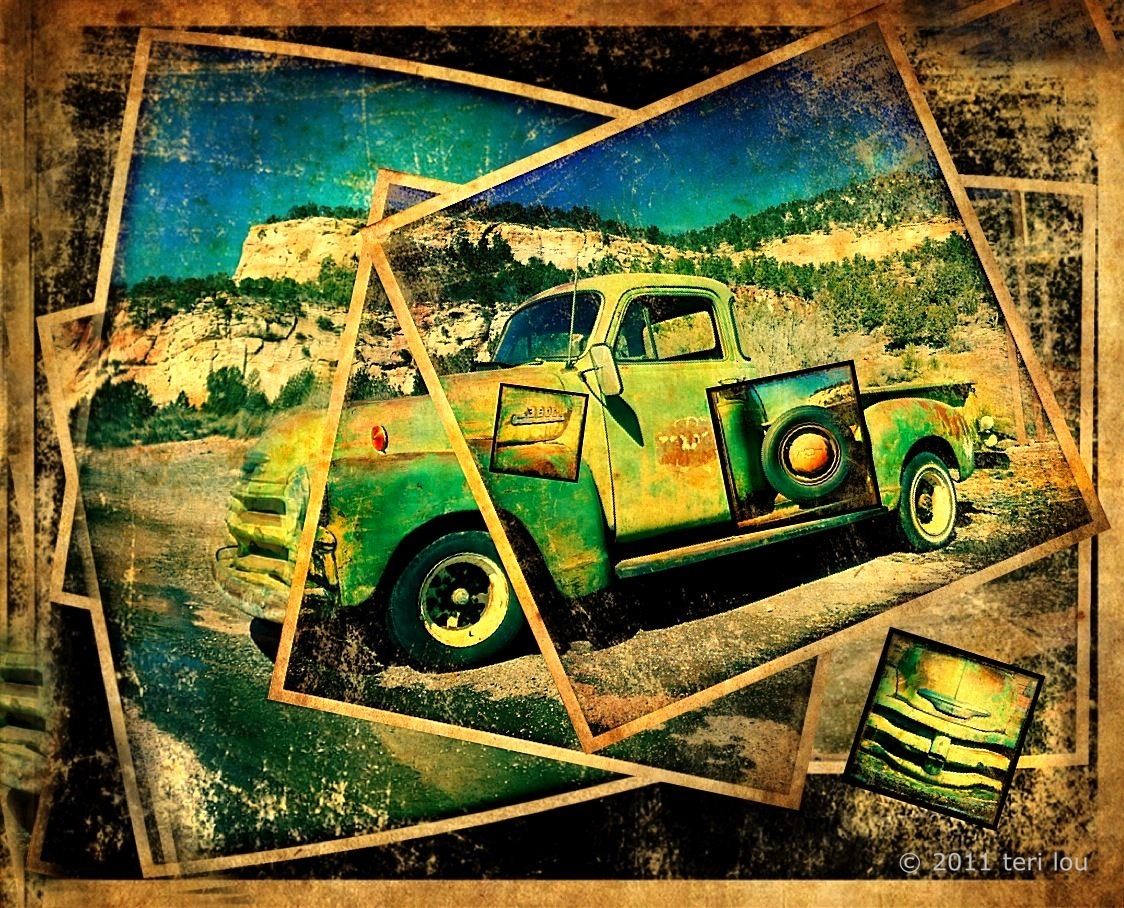
Chevy Truck Hipsta Montage

Built Tough
Some days it is difficult to come up with an original idea to post for the days blog. Today wasn't one of those days.A few days ago I was introduced to a new app 'Montage'. I have been reviewing a few ideas of how others have been using it but was struggling with a new look that was a little different than other montages that I was seeing.
I knew this Chevy that I captured along the way when I was in Utah was a great subject matter to start with. I spent the day attacking the new app from many different angles all day. However none of the ideas were resonating with the look I knew I wanted. As the deadline approached I began again. This time I was smiles from ear to ear as I added new layers and put them into place. So in honor of a Autostitch Hipsta style, I have rebuilt this Chevy from several images I captured that afternoon. For today's post, I offer this twist on a traditional montage image. The details of how I blended this beauty together will be explained in my iCreativity course that starts Monday, April 18th. Contact me at teri@terilou.com for more information.

Hipstamatic
AutoStitch
Montage
and others


Take your iPhone images to the next step with the power of blending, brushing and masking. Teri Lou is offering her first online advance course starting April 18th. Ask for more information about the course at teri@terilou.com

April 6, 2011

Morning Coffee

picGrunger Review
Pioneer Coffee, Cle Elum, WA
Today I am reviewing the update to picGrunger, one of my favorite apps. The addition of seven textures is a great one, unfortunately, they didn't add a strength slider however. I do like the options of textures they added and used the appropriate one "burlap" for this image. I felt it added a great look to the coffee theme of this image. I was impressed that you could still read Pioneer Coffee after the texture was added.
Another change is the way the image is saved or "Share". The Share screen is confusing even for veteran iPhone users. The term "share' shouldn't be used in the case of 'saving' the image to your Photo Album. In order to save you must turn the sliders from off to on in the Photos line, every time, and then tap 'share it". Basically strange and therefore confusion terminology.
However the addition of being able to share with your Facebook, Flickr, Twitter  and Email friends is helpful to many. I for one never use these ways of sharing because I always want to sharpen after using picGrunger, as I did with PhotoForge for this image. Also, I always want to add my copyright with Impression. I also used PhotoStudio during the processing of this image.
Overall, I think the simple addition of seven textures to picGrunger was a worthwhile. I do hope in the very near further a strength slider will be added. Unfortunately I haven't found a link to contact the developers to make that suggestion.


Advanced Course starts April 18th
Take your iPhone images to the next step with the power of blending, brushing and masking. Teri Lou is offering her first online advance course starting April 18th. All critiques will be done via a weekly phone call. Ask for an outline of the course at teri@terilou.com

February 23, 2011

More Relics


Junk Yard Relic - Only 50,000 miles!

I keep going back to the images I captured this afternoon on my way to Portland, OR. The memories of Mr. Relic are fond and etched in my memory forever. He may have a gruff demeanor but his heart is large.
I just finished preparing prints to bring to him later this week since I will be heading south on Saturday for another wonderful photographic road trip.
I think he will be impressed with how well the iPhone captured and processed his Rusty Relics
. 

Mr. Relic


Do you want to learn to use the apps of the iPhone to create photographs beyond a basic snapshot? Sign up for the iPhoneography 101 online course for easy to follow instruction. The course allows you to work at your own pace while having a professional standing by to provide assistance, answer questions and offer critiques. Starts March 12th - sign up now! Contact instructor: Teri Lou at teri@terilou.com and ask for a course outline.

February 17, 2011

Sunrise at the Badlands


God is really only another artist. He invented the giraffe, the elephant and the cat. He has no real style. He just goes on trying other things. ~ Pablo Picasso


What a glorious morning this was!!! Hope you are having one today!
This image was captured with 8 ProHDR images and stitched together. Processed exclusively in Filterstorm, including the frame!
Don't forget to read the iPhoneography tips on the sidebar.


iPhoneography 101 Course - Learn to use the apps of the iPhone to create photographs beyond a basic snapshot. This online course allow you to work at your own pace while having a professional standing by to provide assistance, answer questions and offer critiques. Starts March 12th - sign up now! class size is limited. Contact instructor: Teri Lou at teri@terilou.com

February 15, 2011

Carpenter Museum

Carpenter Museum built 1914

I was driving through my hometown yesterday looking for hearts, when I decided to stop and capture this local historical house. It is another example of me waiting 18 years to capture something I have driven by several times.

For me, the iPhone has opened up my eyes and my heart to more possibilities. This image is a reflection of the artist I have become. This time when I was driving by the house I saw it an opportunity for me to practice creating a vintage photographic look. What I would normally see as a rather dull scene, without much color in the yard, on the house or in the sky, now became a challenge.

I will admit that I went in several wrong directions before I found just the right apps to do the job.  Most were creating a muddy mess. After I got the image to glow I still needed to spend time finding the right frames. I also spent time in Filterstorm with the brush and eraser.

ProHDR - 11 images
Autostitch
Vintage
Iris
Filterstorm
PicGrunger
Impression

This image's processing technique will be part of my Advance Course that I am preparing for now.
iPhoneography 101 Course - Learn to use the apps of the iPhone to create photographs beyond a basic snapshot. This online course allow you to work at your own pace while having a professional standing by to provide assistance, answer questions and offer critiques. Starts March 12th - sign up now! Contact instructor: Teri Lou at teri@terilou.com

February 11, 2011

The Yellow Truck

I finally stopped after 18 years

The iPhoneography 101 course starts tomorrow!!! So I thought I would give you a preview to the before and after image I will be explaining in detail with step by step screen prints during the class.

Since there has been some confusion, I wanted to explain further that the classes will NOT be taught at any specific time. Instead students will receive written materials with lots of instruction and information to follow each week at their own pace. At the end of the week images will be submitted for critique. Then on Saturday morning once again additional app instruction and information will be provided. The apps will be introduced in a succession of difficulty.

At the end of the course you will have a camera bag full of new gear and 
a clear understand of how to use the darkroom in your pocket.

Before Processing
This old truck has been sitting out in a field for years. Everyday I drive past it thinking, "I want to photograph that truck someday." So today when I was on a mission to use my new Hipsta Chunky lens before the sunset, I once again started to drive by without stopping. However the light was just too good not to stop this time. At first I used ProHDR to capture 6 images I then stitched together. Then I took out my Hipsta and played, getting in nice and close. 

Hipsta Chunky
"Everything around us is made up of energy. 
To attract positive things in your life, start by giving off positive energy."


I was just informed of more good news about fxPhotoStudio
 "We are releasing FX Photo Studio HD for iPad next week, on Tuesday, February 15th." 
You can read their blog at fxphotostudio.tumblr.com


iPhoneography 101 Course - Learn to use the apps of the iPhone to create photographs beyond a basic snapshot. This online course allow you to work at your own pace while having a professional standing by to provide assistance, answer questions and offer critiques. Starts February 12th - sign up now! Contact instructor: Teri Lou at teri@terilou.com

February 9, 2011

You Gotta See This Relic Bug!


The You Gotta See This camera app is fun to play with. It is tricky to get to work well but after some instruction and practice you will be creating attention grabbing images. I captured this image near Portland, OR on the private property of Rusty Relics. A very kind gentleman, once you get to know him, allowed me to take some of my best old car iPhone images of his treasures.
I took this image right before Christmas last year and am not sure of which apps I used, sorry. I felt is was too good and original not to share!

iPhoneography 101 Course - Learn to use the apps of the iPhone to create photographs beyond a basic snapshot. This online course allow you to work at your own pace while having a professional standing by to provide assistance, answer questions and offer critiques. Starts February 12th - sign up now! Contact instructor: Teri Lou at teri@terilou.com

February 7, 2011

iCity Center - Las Vegas


iPainted the City Center of Las Vegas

The minute I saw these glowing gold buildings outside my hotel window I knew I had to capture them. They are true architectural beauties, tilted in the slightest degree away from each other.

I hand iPainted this image on the iPad.

ProHDR
Autostitch
Perfect Photo
PhotoStudio
PhotoForge
PhotoWizard emboss
Filterstorm
Impression


iPhoneography 101 Course - Learn to use the apps of the iPhone to create photographs beyond a basic snapshot. This online course allow you to work at your own pace while having a professional standing by to provide assistance, answer questions and offer critiques. Starts February 12th - sign up now! Contact instructor: Teri Lou at teri@terilou.com

February 6, 2011

The Streets of Portland

I wish I had my bike so I could ride with them.


This blog post is dedicated to Vivian Maier, a street photographer, who spent her life capturing the lives of others.

It is easy to see why the Hipstamatic camera app is so popular. One of my favorite things to do is capture candids with it. I enjoy casually standing on a street corners waiting for the moment to come to me. I stand there looking as if I am texting or waiting for a call when instead I am people watching. I think I am being coy, but most likely many of my subjects are very aware of what I am up to since, most of the time, I have a fully extended tripod propped up against me. Oh, well. Maybe someday I will be brave like my friend Dick and simple approach them and ask if I can take their photo. However it would be a much different image then.

These images were captured on my last day in downtown Portland, street walking. I sharpened and saturated all of them with PerfectPhoto. I made the collage with Diptic.


iPhoneography 101 Course - Learn to use the apps of the iPhone to create photographs beyond a basic snapshot. This online course allow you to work at your own pace while having a professional standing by to provide assistance, answer questions and offer critiques. Starts February 12th - sign up now! Contact instructor: Teri Lou at teri@terilou.com

January 30, 2011

Las Vegas City Center

180 degree view
Photograph:  a picture painted by the sun without instruction in art.  ~Ambrose Bierce

Moved from photographing Abandoned Buildings in Death Valley to the Big City of Las Vegas. A 180 degree capture of the City Center, autostitched. The setting sun added lots of drama and great reflections. 


For this image I used the power of Filterstorm. This very complex app allows for blending in a variety of methods. I am putting together a online lesson plan that will help explain the various filters and canvas controls. 


A 4 week beginner iPhoneography lesson plan will be available for sign up on Monday. Ask to see an outline description. Classes start on February 14th.


ProHDR - Autostitch
PhotoForge - Watercolor/oil
Filterstorm - opacity blend blend blend
Filterstorm - sharpen
Filterstorm - frame
Impression


Please contact me for further information. teri@terilou.com Please join my Facebook Group iPhoneography with Teri Lou

January 22, 2011

A 180 Degree Courtyard View


Stadium High School 
Last Monday, I did one of my favorite things, went shooting with a fellow iPhoneographer. He took me around Tacoma to some of his favorite spots. One of the places we visited was Stadium High School. I had never been there and was very surprised by how beautiful and stately it was.  This is a 19 ProHDR image stitch of just half of the courtyard. I then reversed the image and stitched the two images creating a 38 image capture. I extensively processed this image to create a vintage look. I also smudged the frame for a unique appeal.

ProHDR
Autostitch x2
Perfect Photo
Touch Retouch
ArtistaVintage
Artista Sketch
PhotoForge
Iris
Photo Factory
PS Express
Impression


The original after it was stitched twice using AutoStitch.
iPhoneography classes from beginner to advance are available in either classroom style of via the internet. Please contact me for further information. teri@terilou.com Please join my Facebook Group iPhoneography with Teri Lou

January 20, 2011

A Classic Single Tree - with a twist

The Twist

Driving along Skyline Drive in Virginia was absolutely gorgeous this past October.  A storm was brewing causing the wind to blow and the sun to pop in and out of the clouds. The fog was rolling through the valleys. It was a perfect autumn day, even though it made photographing a challenge. There are many pull offs along the Drive and I took advantage of most of them, driving in to take a peek at the scenery. At this particular stop I found my lone tree. The sun popped out for a moment to illuminate the branches with a warm cast of the late afternoon.
It wasn't until about a month later I processed this image. I had just recently discovered the app Iris and was practicing my skills. I found it to be extremely powerful. It is still a favorite app of mine that I use often.

ProHDR
Iris
PhotoStudio
Iris
Photo Copier
Impressiom
Please contact me for further information. teri@terilou.com Please join my Facebook Group iPhoneography with Teri Lou

January 19, 2011

Simply B&W

Glass Museum in Tacoma, WA
I was introduced to a new app yesterday, Photo fx Ultra, designed by The Tiffen Company. It simulates many of the popular Tiffen glass filters, effects and processes. It contains 934 presets, which is a lot of choices. You can layer one effect onto another and even use a masking eraser and brush.

This image was captured with the ProHDR camera and process strictly in the Photo fx Ultra app for the iPad, with the exception of the frame. I layered several choices on top one another in this order:

Polarizing
Glimmerglass
Strip Grad - Magenta
Black and White - Red at 95%
Sharpen
Light Streak
B/W Looks - Flashback

I also added my signature. Can anyone figure out how I did within this app?

The colored version partially processed.


Please contact me for further information. teri@terilou.com Please join my Facebook Group iPhoneography with Teri Lou

January 17, 2011

fx PhotoStudio step by step

Sunrise at Hanson Pond

I decided to do something a little different today because I saw that fx PhotoStudio has preset codes you can enter into the app. So I took one of my favorite sunrise photos and added many effects within the app to create a code I will share with you. Something else I am doing differently is posting screen shots of my iPhone to show you exactly which effect I was using and where the slider(s) were for that effect. This way you can also see the changes step by step.

First I opened my image in PhotoStudio. I then tapped on 'fx' at the top and then 'all effects' at the bottom. I applied the effects in this order: 61 Saturation, 104 Rainbow Palette 2, 153 Hot Yellow, 179 Cross Processing 3, 65 Night Vision, 162 Vignette White 1, 170 Photo Border 1, 173 Photo Border 4. The code you can enter into Presets is C64ADC50. Tap 'Presets', '+AddNew' and then 'Enter Preset Code'.

Original Image


After saving my image I opened it in PerfectPhoto to sharpen and then Impression for my copyright.

I hope you enjoy the results!              

If you don't know how to capture a screen shot you will love this helpful hint: Quickly and at the same time press and release the on/off button and the home button. The screen should flash if you have done it correctly. The photos are stored in you album.
iPhoneography classes from beginner to advance are available in either classroom style of via the internet. Please contact me for further information. teri@terilou.com Please join my Facebook Group iPhoneography with Teri Lou

January 14, 2011

Creating Mood and Emotion

Antique Store in an Old Barn
Something I struggled with is putting emotion into my images. With the iPhone apps, however, I have expanded my creative processing beyond my imagine, allowing me to express myself in so many ways.

I always admired so many techniques that  other photographers were doing, however the cost of all the plug ins to Photoshop made it prohibitive to just go out and buy them. However that is not the case with iPhone apps. At 2 and 3 bucks each I can easily make the decision to give it a try!

So try I have, currently I have 93 photographic related apps. Crazy I know! I have 22 different camera apps alone. Some also provide great post processing options. I have listed my top favorite apps, at the moment, in the right hand column. If you ever have any questions about any of them let me know.

Okay on to the image at hand...
I stopped by this barn because it had a great sign on the outside of it. Since I needed to be on the property to get a good image with my iPhone I had to ask for permission. When I entered this barn and saw how wonderful it was inside I instantly changed my mind and now had to ask permission to photograph inside. So with permission I walked around getting many detail shots.

What I wanted to do is capture a true sense of place and decided I needed a wide shot to do that well, so I shot 3 ProHDR images that I could later stitch together in Photoshop - please keep in mind I was a newbie at the time and didn't even image that I could AutoStitch in the iPhone itself . (BTW Autostitch is incredible, some say better than Photoshop!)

When I finally Autostitched this image I wanted to make it look like a period piece, age it a bit. I am very happy with the emotional choices I made.

Thanks for stopping by today.


3 ProHDR images
AutoStitch
Photo studio
Iris
picGrunger
Impression


iPhoneography classes from beginner to advance are available in either classroom style of via the internet. Please contact me for further information. teri@terilou.com Please join my Facebook Group iPhoneography with Teri Lou